As you scroll through your Instagram DMs, you may notice a small orange triangle or flag icon next to a conversation. If you’re wondering, “What is the Instagram Orange Triangle?”, it is a way to flag an important conversation so you can identify and manage it more easily from your inbox.
but hold on! “What is the Instagram Orange Triangle?” exactly? Understanding what drives Instagram’s algorithm in 2025 can help explain why this triangle appears and how it affects your messages.”
The orange flag is particularly useful for people who receive a high volume of Instagram messages, including creators, businesses, and other professional account users. Instead of letting an important conversation get buried among newer messages, you can use the flag to mark it for easier follow-up.
In this guide, we’ll explain what the orange icon means, who can use the feature, how to flag and unflag conversations, and what the feature can, and cannot, do.
What Does the Orange Flag Mean on Instagram?
The Instagram Orange Triangle is one of the Instagram direct message icons you may see next to a flagged DM conversation. It helps you mark conversations that you consider important, making them easier to identify and manage in your inbox. Understanding the Instagram DM triangle meaning can help you distinguish this icon from other symbols and message indicators.
Flagging a conversation is a personal organization feature. It does not send an alert to the other person or change the conversation for them. The flag is primarily designed to help you keep track of conversations that may require attention later.
It’s also important not to confuse the orange flag with Instagram message warnings, error messages, or the Pin feature. Flagging and pinning serve different purposes: a flag helps you mark a conversation for management, while pinning places a conversation in a prominent position in your inbox.
For users who regularly manage client messages, collaborations, inquiries, or other important conversations, the flag can provide a simple way to organize their Instagram inbox.
Mastering the Instagram Orange Triangle is a simple way to reclaim control over your DMs. For more tips on growing your account strategically, see “How to Increase Instagram Followers in 2025.”
How to Flag Direct Messages on Instagram?
If you want to mark an important Instagram conversation, you can use the Flag option available to eligible professional accounts. Instagram’s interface can vary depending on your app version, account type, and device, so the exact placement of the option may differ.
A typical process is
- Open Instagram and go to your DM inbox.
- Find the conversation you want to mark.
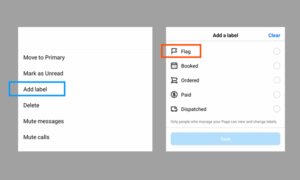
- Open the conversation’s available management options, such as the chat menu or conversation controls.
- Select Flag if the option is available. This is how you use Instagram message flags to mark an important conversation for easier follow-up.
- Once flagged, the orange flag or triangle indicator can appear next to the conversation.
- When you no longer need the conversation flagged, open its management options again and select Unflag.
This Instagram Orange Triangle feature is associated with Instagram’s Professional accounts, including Business and Creator accounts. If you don’t see the Flag option, it may not be available for your account, app version, or current Instagram interface. Orange-flagged conversations can be easier to identify when you’re managing multiple important DMs.
Keep in mind that Flag is not the same as Pin. Flagging marks a conversation for your own inbox management, while Pin is used to keep selected chats prominently positioned in your inbox.

What Are the Advantages of Using Instagram’s Orange Flag?
In a world where our inboxes are constantly flooded (from memes to marketing messages), it’s easy to lose track of what really matters. That’s where this feature steps in, not just as a feature, but as a strategic tool for digital survival.
- Instant Prioritization: Need to reply to a client later, follow up with a collaborator, or revisit an important lead? Use the Instagram flagged messages feature to highlight them now and return when ready, no scrolling, no stress.
- Clutter-Free Organization: With the ability to flag important chats, your inbox transforms from chaos into clarity. It’s a way to mentally and visually separate what’s urgent from what’s optional.
- Never Lose a Key Message Again: Whether it’s tucked away in your Instagram message requests or accidentally swept into your Instagram filtered inbox, important messages can disappear fast. A flag acts like a spotlight, keeping them visible and top-of-mind.
- Quick Access = Faster Response: Using the filter tool, you can instantly pull up flagged messages, giving you more speed and control in responding. Perfect for time-sensitive communication.
- Discreet and Private: Unlike other message actions that may trigger Instagram message notifications, the Flag is private. No one but you sees it, making it ideal for personal workflow or professional discretion.
- Enhanced Communication Security & Workflow: While not a direct security feature, flagging supports stronger Instagram communication security by ensuring that sensitive or strategic conversations are easier to monitor, manage, and act upon.
Instant Prioritization: Need to reply to a client later, follow up with a collaborator, or revisit an important lead? Flag your messages, or even save content using InstaLite Instagram downloaders to keep everything organized.”
Why Can’t I See the Instagram Orange Flag on DM?
If you don’t see the Instagram Orange Flag in your DMs, it doesn’t necessarily mean there’s a problem with your account.
The feature may not be available to every user, and the Instagram DM interface may look different from one account to another based on factors such as account type, app version, and feature availability.
Here are some common reasons why the Orange Flag may not appear:
- You’re using a personal account: The Flag feature is primarily associated with Instagram Professional accounts, including Business and Creator accounts.
- Your Instagram app needs an update: An outdated version of Instagram may not display the latest DM features or interface options. Check your device’s app store for an available update.
- The feature isn’t available to your account: Instagram sometimes makes features available gradually, so two accounts using the same app version may not have identical options.
- Your DM interface looks different: Instagram regularly tests and changes its messaging interface. The location or appearance of DM management options may therefore differ between users.
Temporary app issues: If you should have access to the feature but cannot find it, restarting Instagram, checking for updates, or logging out and back in may help resolve a temporary interface issue.
Important Points of the Article About the “Instagram Orange Triangle”
|
Feature |
Description |
Who Can Use |
How to Activate / Deactivate |
Benefits |
|
Orange Triangle |
A small orange flag next to a DM |
Business & Creator accounts only |
Long-press or swipe → select “Flag” to activate; “Unflag” to remove |
Prioritize messages, avoid losing important chats, track key conversations |
|
Message Filtering |
View only flagged messages |
Business & Creator accounts only |
Tap Filter icon → choose “Flagged” |
Focus on important conversations quickly |
|
Privacy |
Only visible to the user |
All flagged messages |
Automatic |
Messages remain private; other users cannot see the flag |
|
Quick Access |
Easy retrieval of important DMs |
Business & Creator accounts only |
Use the Filter or scroll through flagged messages |
Faster responses to urgent messages |
|
Inbox Organization |
Declutters your DM inbox |
Business & Creator accounts only |
Flag important conversations |
Reduces clutter, separates urgent from optional messages |
|
Productivity |
Helps manage workflow |
Business & Creator accounts only |
Flagging messages strategically |
Increases efficiency, prevents missed messages |
High Point
Understanding what the Instagram Orange Triangle means can make managing a busy DM inbox much easier. The feature is designed to help eligible professional account users mark important conversations and return to them when needed.
If you regularly receive client inquiries, collaboration requests, or other messages that require follow-up, using the Flag option can be a simple way to keep those conversations easier to manage. Just remember that Flag is an organization tool, not a security feature—and it is different from Instagram’s Pin option.
How about you? Have you used the Orange Flag in your DMs? Share your thoughts below! What other features would make flagged messages more powerful for you? If you have any questions about the Instagram DM orange flag? Ask away, we’ll answer them in a follow-up!
What does the orange triangle in Instagram DMs signify?
It indicates that you’ve flagged a conversation to mark it as important, like a personal bookmark. Only you see it.
Who can use the Instagram Orange Triangle DMs?
It’s currently available only for professional accounts (Business or Creator profiles). Personal accounts don’t have access.
How do I remove (unflag) the orange triangle from a DM?
Use the same gestures; you can swipe left and tap Flag again, or long-press and choose Unflag from the label options.
Can I filter DMs to show only flagged conversations?
Yes. In the DM inbox, tap the filter (funnel) icon and choose “Flagged” to view only those marked chats.
Does flagging a DM notify the other person?
No, flagging is strictly private. The other person has no way of knowing you’ve flagged the conversation.